
In the current era, the office is no longer a physical place where employees gather to do work.
Now, every place where employees work is an office. How? The online platforms have become the heartbeat of every office, leaving no room to limit productivity.
The employees are connected to each other via virtual meetings and conference calls to cooperate, collaborate and work together.
The office, whether a fixed workstation or a home office, is a place of chaos.
The clatter of keyboard, notifications popping up, the gossip of colleagues, whispers, and the background noise are part of the office environment.
All these factors are the culprits behind the poor communication, but you can’t get rid of them. Here’s one central device that nullifies the effect of these factors.
What’s that? The headset!
“A headset is the bridge between the problem and solution, a complaint to resolution”.
From online meetings and digital conferences to customer calls and creative brainstorming sessions, you need a headset.
A headset that will ensure clear communication, the key to productivity and success.
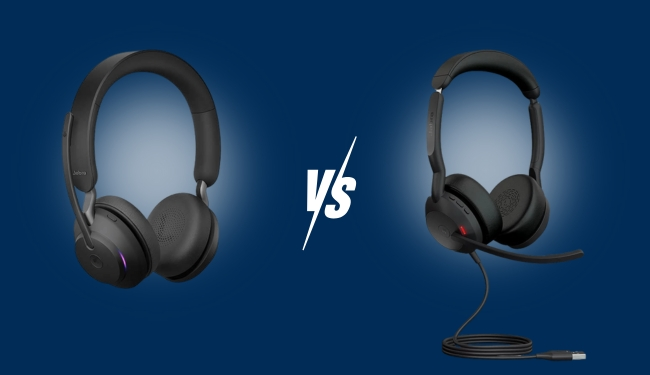
But what type of headset to purchase: The USB headset or the Bluetooth headset?
In this guide, we are going to debate USB vs Bluetooth headsets, which one is better for your office use.
We will discover in detail the prominent features of USB and Bluetooth headsets to help you choose the headset that truly suits your office needs.
Let’s begin!
What is a USB Headset?
A USB headset is a type of headset that connects to the computer or other device via a USB (Universal Serial Bus) port and a dongle.
It operates with a USB-A/ USB-C plug and Bluetooth 5.3 + USB dongle for delivering the voice digitally.
They have become a universal standard headset for business communication, from conference calls to customer calls.
Their compatibility with Teams, Zoom, Google Meet, and other such platforms have made them indispensable for professional communication.
Advantages of USB Headset
The prominent advantages of USB headsets include plug-and-play functionality, UC compatibility, Active Noise Cancellation (ANC) and a stable internet connection.
Moreover, they have built in software controls like answer/end calls that do not make you rush towards the computer.
One of the best advantages is the zero to low latency rate, and the voice quality remains the same.
Types of USB Headsets: Wired vs Wireless
Do you also wish to have a headset that has all the functionalities of the USB headset, but must be a wireless headset?
Then, congratulations, your wish has come true!
Now, the USB headsets are not limited to wired headsets only; the wireless USB headsets have boomed the market. But with the wireless boom, the importance of the USB headset is not diminished.
Let’s compare both wired and wireless USB headsets to choose which one is best for you:
Wired vs Wireless Headsets Comparison
Find the perfect headset for your work style and needs
| Factors & Features | Wired Headsets | Wireless Headsets |
|---|---|---|
| What are they? | The wired headsets connect directly to the computer or device using a USB-A or USB-C port, which leaves no chance for latency. | The wireless USB headsets are modern headsets that combine Bluetooth functionality with the USB dongle to connect to the computer wirelessly. |
| Advantages | Zero latency with no signal loss Plug-and-play connectivity Budget-friendly headsets for professional-grade sound Minimal maintenance and long-term durability | Freedom to move and multi-task Multi-device connectivity Active Noise Cancellation and Environmental Noise Cancellation for excellent sound quality Comfortable and modern design |
| Use Cases | Best used for customer support teams, remote teams with fixed workstations, and employees who work in quiet home offices. | Best used for open space and noisy home offices, remote workers who switch between desktop and mobile for work, and professionals on the go. |
| Connectivity | These headsets use only USB-A and USB-C plugs. | These headsets use a USB dongle with Bluetooth 5.3 technology. |
| Noise Cancellation | The USB wired headsets use a Passive ENC microphone. | The USB wireless headsets use Active + Environmental ANC/ENC mics. |
| Ergonomic Design | Lightweight headset with adjustable headbands and soft earpads. | Slightly heavier headsets due to batteries, ergonomic earcups, rotating mics and foldable design. |
| Mobility | They limit you to moving only by a cable length. | They let you move freely within a wireless range of 30 to 50 feet. |
| Battery Life | Directly plugged into the computer, so there is no need for batteries. | The average battery life is 30 to 50 hours on a single charge. |
| Compatibility | They are 100% compatible with PC and the softphones. | They are compatible to use with PC, mobiles and tablets. |
| Durability | They are highly durable due to the cable connection. | They are slightly less durable because of the batteries that degrade over time. |
| Price Range | They are easily available in the range $50 to $120. | These headsets are available in the price range $100 to $300+. |
| Recommendation | Users with static and fixed workstations, hybrid professionals who need freedom to multitask, and users who want budget-friendly headsets. | A creative professional who needs to listen to music and call versatility. |
| Examples | Mairdi MRD-509UC Wired USB Headset, EPOS Impact 1000 Series, Yealink UH37, Jabra Evolve2 40 SE / BIZ 2400 II | Mairdi M890BTD Wireless USB Headset, Jabra Evolve2 65 Flex Stereo Headset, Poly Voyager Focus 2 Headset |
Plug-and-play connectivity
Budget-friendly headsets for professional-grade sound
Minimal maintenance and long-term durability
Multi-device connectivity
Active Noise Cancellation and Environmental Noise Cancellation for excellent sound quality
Comfortable and modern design
What is a Bluetooth Headset?
A Bluetooth headset is a type of wireless headset other than the DECT headset that does not need a USB dongle to connect to the PC.
It is designed for individuals who prefer freedom of movement within a range of 30 feet while staying on the call.
They are best for hands-free calls, listening to music and watching videos without being tethered to the device.
They can be connected with smartphones and laptops as well.
Advantages of Bluetooth Headsets
Clear voice quality, multi-device connectivity, wireless connection and long battery life are some advantages of Bluetooth headsets.
What Type of Headset Do You Need in the Office?: USB or Bluetooth
When you are going to connect a wireless headset to the computer, you think that you can connect without a USB dongle.
You think that your PC has Bluetooth, and your headsets as well, so they will be paired automatically.
Unfortunately, that’s not going to happen.
Because the USB headsets and the Bluetooth headsets are designed on different technologies and for different needs.
The headsets with a USB dongle use a proprietary technology, while the Bluetooth headset uses Bluetooth technology without a dongle.
Connection Stability
The USB headsets are designed specifically for business needs. They have pre-paired connections that ensure a stable connection throughout Zoom and Teams meetings.
On the other hand, the Bluetooth headsets are designed for individual users, not for business users.
The connection is not very stable because of the interference of the PC Bluetooth with the WiFi signals and peripherals.
The users report dropouts and stuttering when they pair the headset with the computer.
Audio Quality
The USB headsets ensure excellent sound quality through the online meeting as they don’t face any interference.
But the sound quality over a Bluetooth headset may degrade because of the interference caused by the Wifi signals and peripherals.
Microphone Performance
The USB headsets have noise cancelling microphone that operates on either Active Noise Cancellation (ANC) or Passive Noise Cancellation.
The microphone cancels out the surrounding noise for delivering a crystal clear voice over conference calls and online meetings.
Conversely, the microphones in Bluetooth headsets are less reliable for business calls and online meetings.
They let the background noise in the sound delivered over the headset.
Wireless Range
The USB wireless headsets offer you an extended range for mobility. It used DECT technology or a Bluetooth dongle that lets you move freely without getting disconnected.
While the Bluetooth headset does not use any USB dongle so the wireless range is limited to 30 meters only.
You can move freely within this range, but the sound quality will degrade.
Call Control Features
The USB headsets have more call management features, answer/end calls.
The user does not need to rush towards the desktop to attend or reject the call. Simply, buttons are built into the headsets.
The Bluetooth headsets lack modern call management features, and you have to manage calls on the PC.
Software Integration
The USB headsets have USB dongles that automatically update the firmware, enable applications for customization, and settings for work needs.
On the other hand, the Bluetooth headsets offer little customization with minimal Windows app support.
Compatibility
The USB headsets are UC-certified and have a plug-and-play functionality to connect with Teams, Zoom, Google Meet and more.
The Bluetooth headsets are not UC compatible; they connect, but face mic issues when paired.
Ease of Setup
The USB headsets are easy to set up, as you just have to plug the pre-paired dongle into the USB-A or USB-C port.
It’s great for office employees who are always short of time.
The devices are paired for connection. The pairing can be hit or miss at times, creating connectivity issues.
Sometimes you need to re-pair, and pairing can be delayed.
Latency and Performance
The USB headset uses proprietary technology and optimized protocols, so latency is little to zero when the voice is delivered.
So the audio is synced perfectly during calls and meetings.
Conversely, when the Bluetooth headsets are used, noticeable latency, i.e., 50-200 ms, is observed.
The latency is observed especially on Windows because there are codec mismatches or driver issues.
Where Recommended to Use
Use USB headsets for noisy offices, call centers, and hybrid setups where active noise cancellation is paramount.
They are designed to fulfill business needs like compatibility with UC platforms, built for uninterrupted long calls.
Real World User Scenarios for USB & Bluetooth Headsets
Are you still confused about choosing which headset best suits your needs?
It’s quite normal, and many people have difficulty deciding.
Let’s make this simpler with the help of real-world user scenarios:
Call Centers
Consider you are calling to customer care agent for the renewal of your internet subscription service.
How would you feel if you were unable to hear him because there was too background noise or distortion?
Or was the call being disconnected again and again? You will freak out and will not want to take their service again.
For a call center agent, the voice clarity and uptime are the key to customer satisfaction.
For such agents, USB headsets would be a perfect choice.
Developers and Engineers
The developers and engineers need headsets to stay focused for productivity.
They need comfort as well, and low-latency rates for better output.
For them, the wired and USB headsets are recommended.
Home Offices
For home offices, mobility is the demand of employees for better productivity.
They can’t stick to the desktop all the time when working from home.
For these people, wireless headsets are the best.
Remote Teams with Fixed Workstations
Are you a remote professional who works from home with a fixed workstation?
If so, you must rely on a USB headset that will ensure a stable connection and clear voice in online meetings and calls.
On the Go Professionals
If you are a professional who switches between the desktop and mobile for work, then we recommend that you use Bluetooth headsets or wireless USB headsets.
They will let you be present whenever your name is called in the meeting, whether you are at the desktop or not.
The Final Comparison: USB vs Bluetooth Headset
Don’t want to dive into detail and want to decide quickly?
Not a problem!
Let’s have a quick comparison of USB and Bluetooth headsets and reduce your research time:
USB vs Bluetooth Headsets Comparison
Understanding the key differences to make the right choice
| Features | USB Headset | Bluetooth Headset |
|---|---|---|
| Connectivity Requirements | It requires a USB-A/ USB-C plug and Bluetooth 5.3 + USB dongle to connect to a computer. | It does not require a USB dongle to connect to the computer or device. |
| Specific Needs | When a stable connection is required, a budget-friendly headset is required for large teams. | When freedom of movement while staying on the call is a priority. |
| Freedom of Movement | You can just move with the length of the cable. | You can move freely within a distance of 30 feet without being disconnected. |
| Compatibility | UC Compatible with PCs, mobiles, tablets, softphones, and softphones. | Connects, but can face pairing issues and mic issues. You can be frustrated by setup issues. |
| Noise Cancellation | Both active and Passive noise cancellation are used to filter the background noise, depending on the model you use. Advanced noise-cancelling microphones are used, which makes them best for business use. | These headsets are not designed for business needs, so active noise cancellation is not so good. It lets in the background noise into the mic. |
| Stability of Connection | The USB headsets have a more stable connection and cause uninterrupted calls. | There may be interference with the WiFi signals, so the calls may not be of high quality. |
| Cost | These headsets are budget-friendly in terms of business use than the Bluetooth headsets. | Bluetooth headsets are more expensive because of the battery and the wireless technology. |
| Environmental Impact | The USB headsets contribute less to the e-waste as metals can be recovered easily. It produces less carbon footprint. Moreover, the cable has a long lifespan that does not contribute to land pollution as often as compared to Bluetooth headsets. | The Bluetooth headsets have a more negative impact on the environment than the USB headsets. The batteries and other wireless components produce a larger carbon footprint. |
| Maintenance | Fewer electronic components, which means fewer chances of headset failure. Cable and ear cushion replacement is enough to extend the lifespan. | Need batteries to be replaced after a certain time period. Moreover, these headsets must be updated with the new software updates from time to time for the best performance. |
| Examples | Poly Blackwire 3220 USB-C Headset, Yealink Uh42 Usb-c/a Headset, Mairdi MRD-509UC Wired USB Headset | Sony Wh-1000xm5, Jabra Evolve2 Buds Bluetooth Earbuds, Sennheiser Momentum 4 Wireless, Bose QuietComfort Ultra |
Maintenance and Longevity Tips to Take Full Advantage
Whether it’s a USB headset or a Bluetooth headset, both need regular maintenance to increase their lifespan.

If you regularly maintain your headsets, you will definitely take full advantage of them. Follow the longevity tips to enjoy these headsets for a decade:
Clean Regularly
For the office, you use the headset to streamline communication. Daily use also requires regular cleaning so that the dirt cannot block the headset speaker or microphone. Regularly wipe the dirt from the ear cushions and the boom mic, and enjoy the excellent sound quality.
Store Properly to Prevent Headsets from Moisture and Dirt
The moisture and dirt can block the mic and speakers, which will affect the sound quality. Moreover, if the headset is not stored properly, it will be more prone to damage or breakage. Hang the headset on the hooks or stands.
Update Firmware Regularly
With the advancement in technology, frequent updates are common. If you want your headset to perform perfectly, you need to update the firmware regularly. This will save you time from sorting issues caused by the degradation of firmware.
Replace Batteries of Bluetooth Headsets
The batteries degrade over time and might not last the expected time. But don’t worry, batteries are replaceable at a budget-friendly price that saves you from the cost of a new headset.
Look for the Faulty Parts and Replace
Instead of getting a new headset instantly, look for the faulty parts. Replace the faulty parts like ear cushions, batteries and other parts. They will save costs and prevent you from the hassle of rushing to get a new headset.
All these tips are very helpful in extending the lifespan of your headsets and will prevent you from breaking your bank.
The Final Word (Which One Should You Buy?): USB vs Bluetooth Headset
USB headset or a Bluetooth headset, which one you buy depends on your business needs and priorities.
USB headsets are designed keeping in account the business needs like crystal clear customer calls, video conferences and online meetings.
These headsets offer a stable connection with zero latency and interference during calls.
The sound quality is remarkable without any background noise or distortion.
We recommend Bluetooth headsets if mobility is your priority and you want a hands-free experience during calls.
These headsets offer you freedom of movement within a range of 30 feet.
If you are looking for an online All-in-One platform for high-quality headsets with excellent sound quality, visit Find Headsets.
Leave a Reply
Your email address will not be published. Required fields are marked *